

The Initial Problem
Project background
Throughout my usability testing class, we had constantly been reminded of the technical report we had to complete as our final. Throughout the semester, I had tried to think of services we could test that would be challenging but beneficial to my teams learning experience, but had consistently come up short. Until one day, I was laying under my 2011 Honda Accord trying to fit a crank position sensor in, and it hit me. We HAD to review Rockauto.
Rockauto background
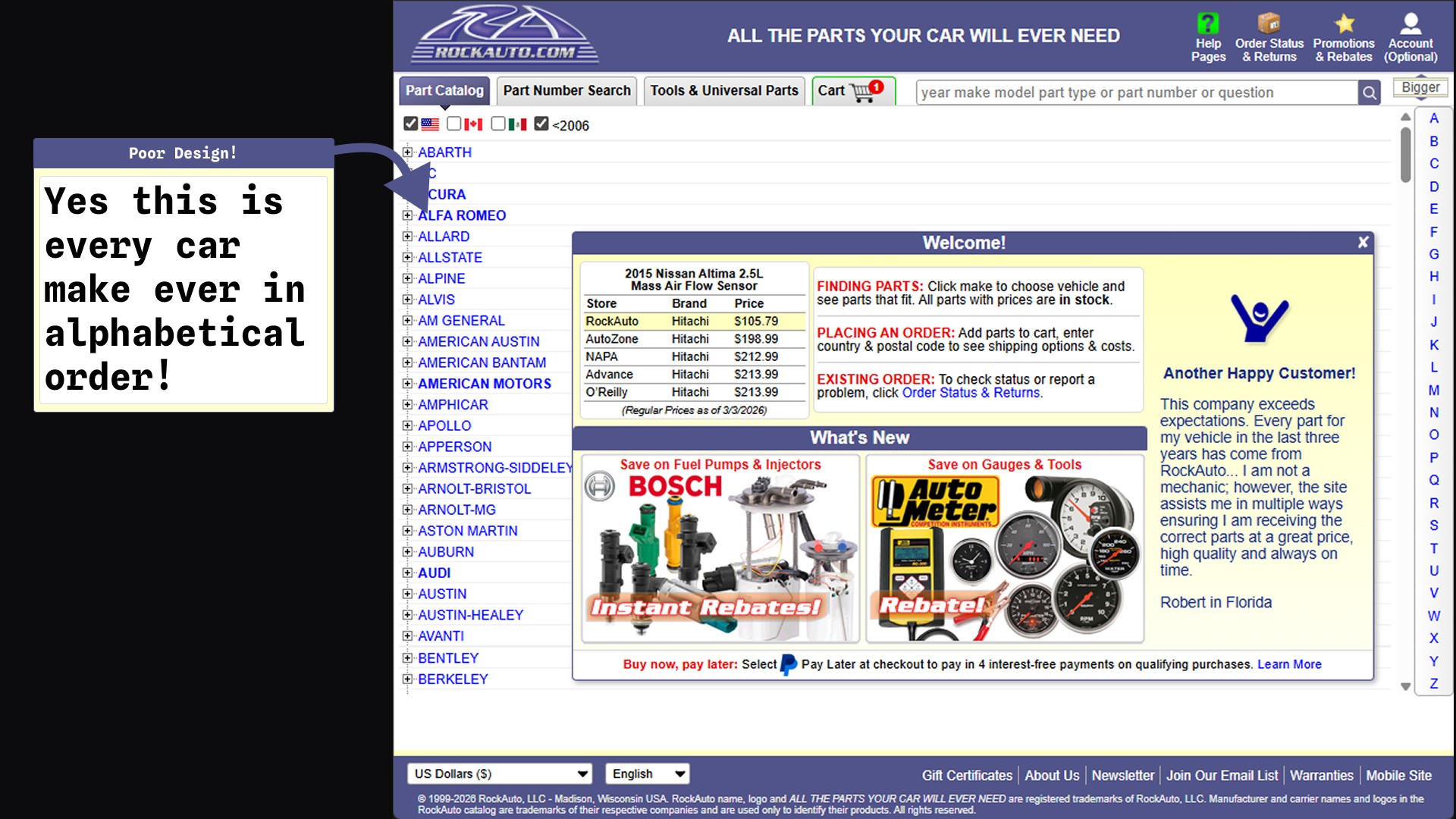
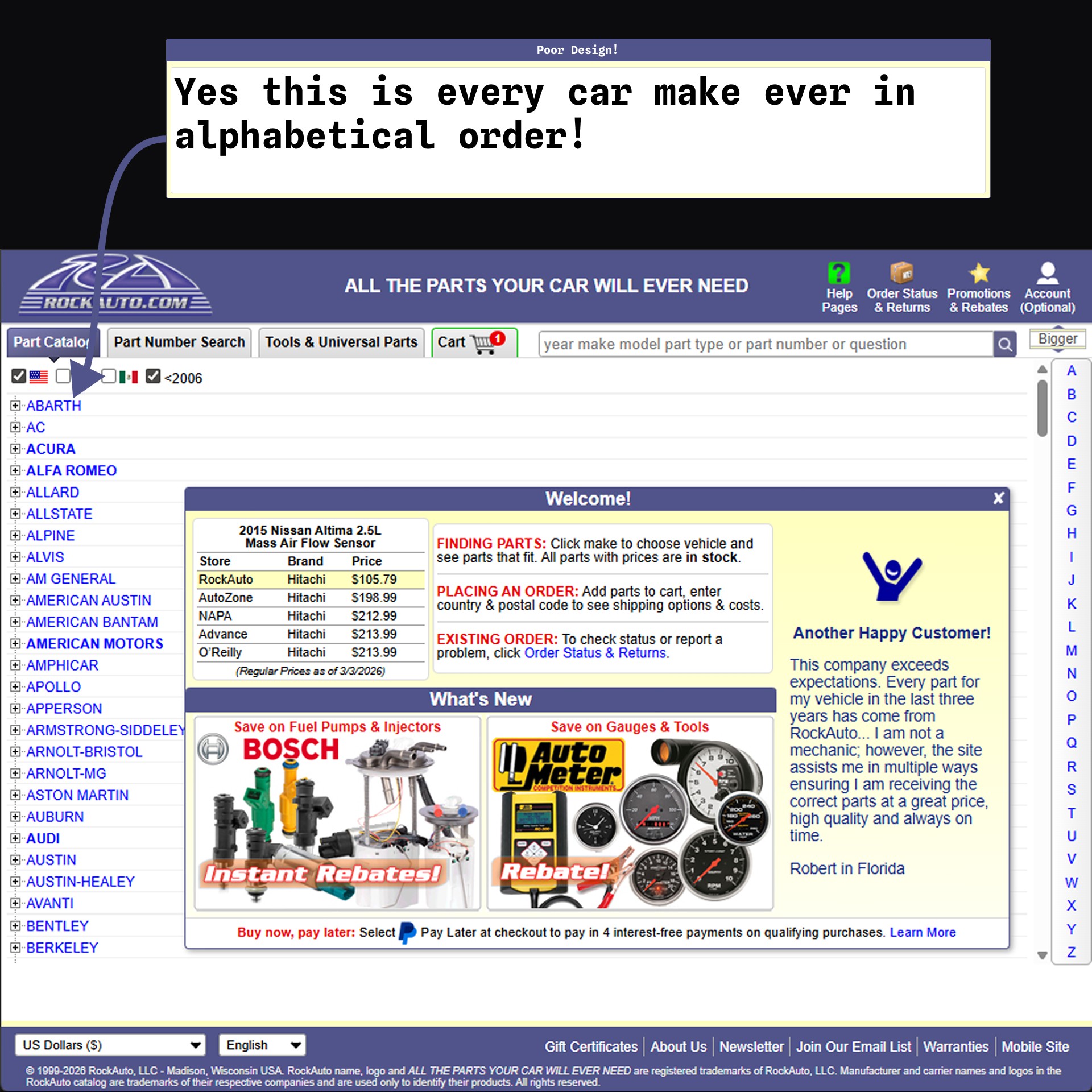
Rockauto is an online automotive parts retailer. It has no physical stores, only an online storefront. It also is notorious for two things, the lowest relative prices for car parts, and the most outdated & daunting web design. There was much to dissect with the service, and I knew my team had to be the one to try and do it.
What we learned
Apart from learning the process of usability testing and all the procedures involved with it, the team had a phenomenal revelation which was caused by a roadblock. While we ended up not interviewing our initial target demographic, we accidentally stumbled upon a goldmine of data by interviewing a different demographic which would represent the average person MUCH better than our original target demographic. This data was invaluable to the team and is what boosted our findings to be as substantial as they are.
Our Approach
Research
Before even beginning our process, we had to learn more about our target demographic and Rockauto's users. Discovering who we were trying to help was our most important task, even if it was the first one. We discovered that our target user was men aged 35-54.
First roadblock
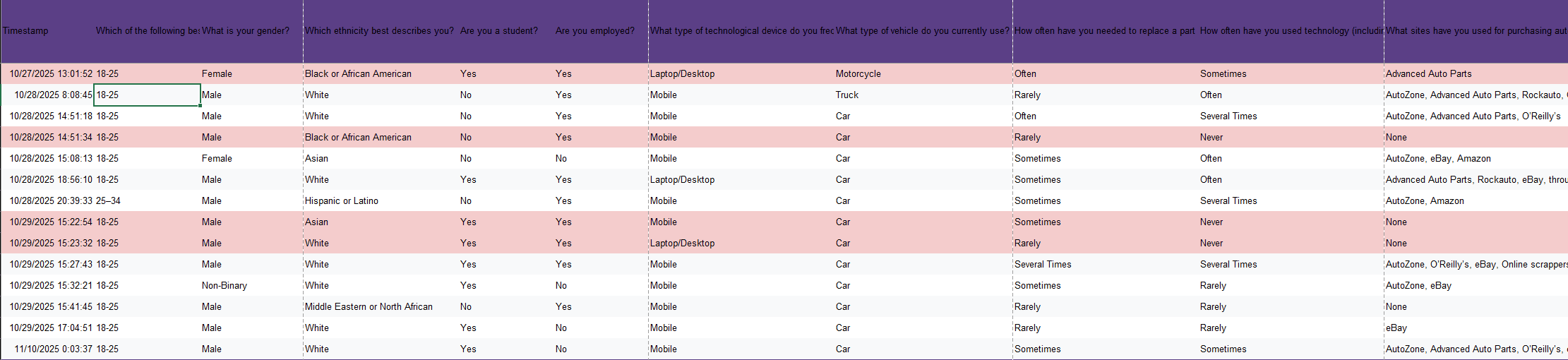
Our team doesn't know very many men aged 35-54 who would be willing to do a usability test with us. We had a user screening survey which we had potential users take and we ended up with a majority of our screened users being 18-25. We had no choice but to take what we could get and we chose to interview the users who passed our screener and were available.
Setting up test procedures
Now that we knew we weren't interviewing the target demographic, we knew that our results could be completely invalidated if we didn't ask the right questions and get the right information our of our users. We had to be careful when planning the next steps, as it would make the difference between useful data and completely null information. We setup our usability test using standard industry procedures, using pre-test questions, a handful of tasks to give the user on the website, and post test questions. This would all be followed with a System Usability Scale(SUS) survey which we would analyze for overall usability of the website.
The interviews
As we began going out into the field and interviewing our users, we realized that this would be a more challenging task than we originally thought. While every user said they had shopped for auto parts before and worked on their vehicle in the last 6 months, there was still an incredibly wide gap in auto knowoledge between each of our users. This made it difficult to gather the data we wanted to, as the users were struggling with terminology and knowledge of auto parts rather than the website.
The detour
While doing our 3rd or 4th user interview, it hit me. We hadn't been interviewing a single 35-54 year old male who is a master mechanic, but we had been interviewing young men and women who had minimal knowledge on the topic BUT were still willing to try the service. This meant that we would find data that's relevant to first-time users as opposed to seasoned veterans of the service. This data could prove to be a gold mine, as it would give us insight on why people would stray away from the service or not return to it. With this new view on our data, we were more passionate than ever about analyzing the data and translating it into potential adaptations in the service.
The Results
Task success rate
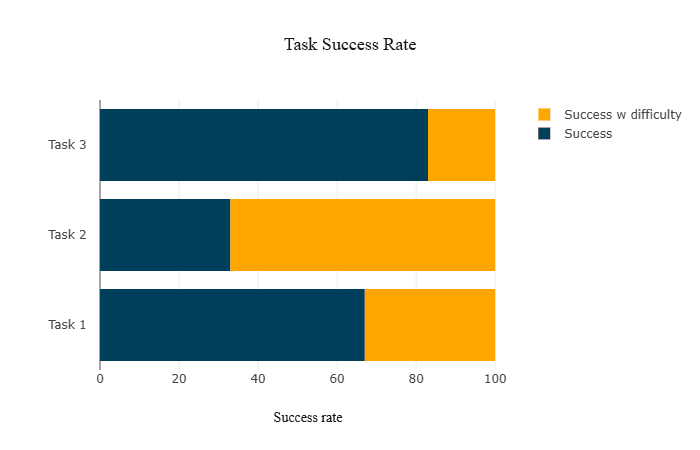
This result shows us what percent of users completed a task, either with or without difficulties. We had no user fully fail a task, but there was a variety of users that had difficulty completing certain tasks. This data would tell us how effective the system is. As the tasks all had a 100% completion rate, we can assume the system to be 100% effective at doing what it's designed to do.
So with this data, we know that Rockauto is effective for ordering auto parts online.
Time on task
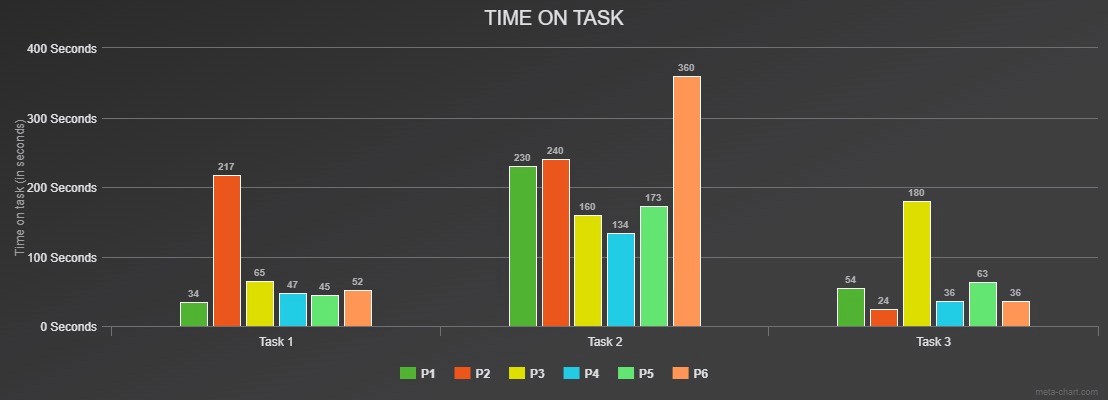
This result shows us how long users took to complete each task. Within this graph, each group of bars is a task and each individual bar is a different user. We can see heavy variation in task 2 as well as outliers in task 1 and 3.
Our findings from the usability tests concluded that the cause of such outliers and variance was from the websites poor design and information architecture, not from a lack or knowledge in automotive parts.
This is an important distinction to make as some of our users had minimal knowledge on automotive parts while others had an advanced level of knowledge.
SEQ per task
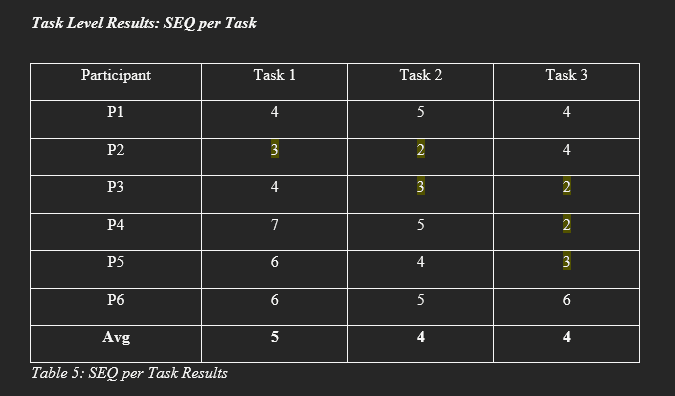
SEQ (or single ease question) is a method used in usability testing to get a general score from each participant after each task. It's rated on a 7 point scale, 1 being the user feeling the worst and 7 being the best.
Our findings from this are a bit paradoxical, as some users who had troubles with the website still gave some tasks a higher score.
This observation is likely a reflection of the observer effect, wherein a user will act differently when being observed.
SES results
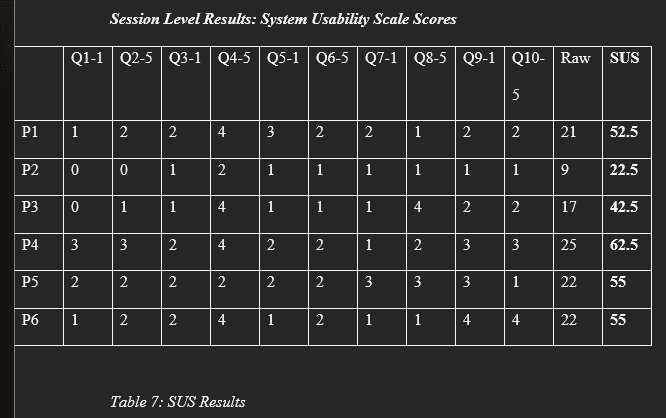
SES (or session level results) is a method used in usability testing to get a general rating of a product from a user. It involves asking a series of specific questions and calculating their score based on their answers.
The average from each participant were averaged out and this gave us overall SUS score for Rockauto, that being a 55.
A score of 55 is bordering the unusable range of the scale, though it is still technically within the usable range. This would explain why all of our users completed the tasks but they still had trouble completing many of them.
Overall, this implies that Rockauto needs some major changes to its UI as to not detract people from using the product.
The (Potential) Application
Solution 1: Improving the UI design
The current UI struggles at outlining a clear hierarchy and providing simple contrast to highlight different categories of information. There are also many unconventional design practices throughout the page, such as unconventional iconography, which confuses users mental models. Changing the UI to be more modernized and follow UI principles would help users feel less frustrated and lost while using the system.
Solution 2: Providing help and documention for new users
Providing extra tooltips and information on the screen to help users who aren't as familiar with auto parts would vastly improve the experience of the service. The current tips are hidden within specific part pages and just finding the parts can be frustrating enough, so many users won't likely see the little amount of help avaiable already. Improving this would help keep newer users using the system even if they lack the knowledge on auto parts.
Allowing the system to handle the complexity in navigation and sorting information would help the user in finding their information quicker. This would also reduce visual complexity since the transfer of complexity from user to system would eliminate the need for users to view excess information. Overall this would help with visual hierarchy as well as reducing cognitive overload in the system.
The system currently uses many outdated and unique navigation tools and icons, and as such its hard for users mental models to recognize the actions that these tools and icons complete. Changing to something that matches users mental models would help improve usability and make it easier for new users to understand their functions.
Reflection
Changing your view
As stated earlier, we didn't end up interviewing a single user that fit our target demographic. This originally would've felt like it invalidated our research, but instead, we changed our view and found our research to be more substantial than before. Trying to do what you can with what your given can be difficult sometimes, but it's important to make the best of it.
The user comes first
Regardless of what system you are testing, the user should always be your first priority. You can design a system for yourself, but if no one else understands it, no one else will use it. That's why usability testing is so vital to new and old products. Listening to your user's feedback can give you insight, whether it's from a novice or a pro, there's something to learn from every piece of feedback.